Best Wireless Microphone Setup for Live Translation: Simple, Easy, and Professional
At Hope Translator, we've tested countless microphone setups for live translation work, and we've found that wireless microphones consistently deliver the best results. In this comprehensive guide, we'll explain why wireless microphones are the optimal choice for live translation, how simple they are to set up, and how to maximize their performance in any environment.
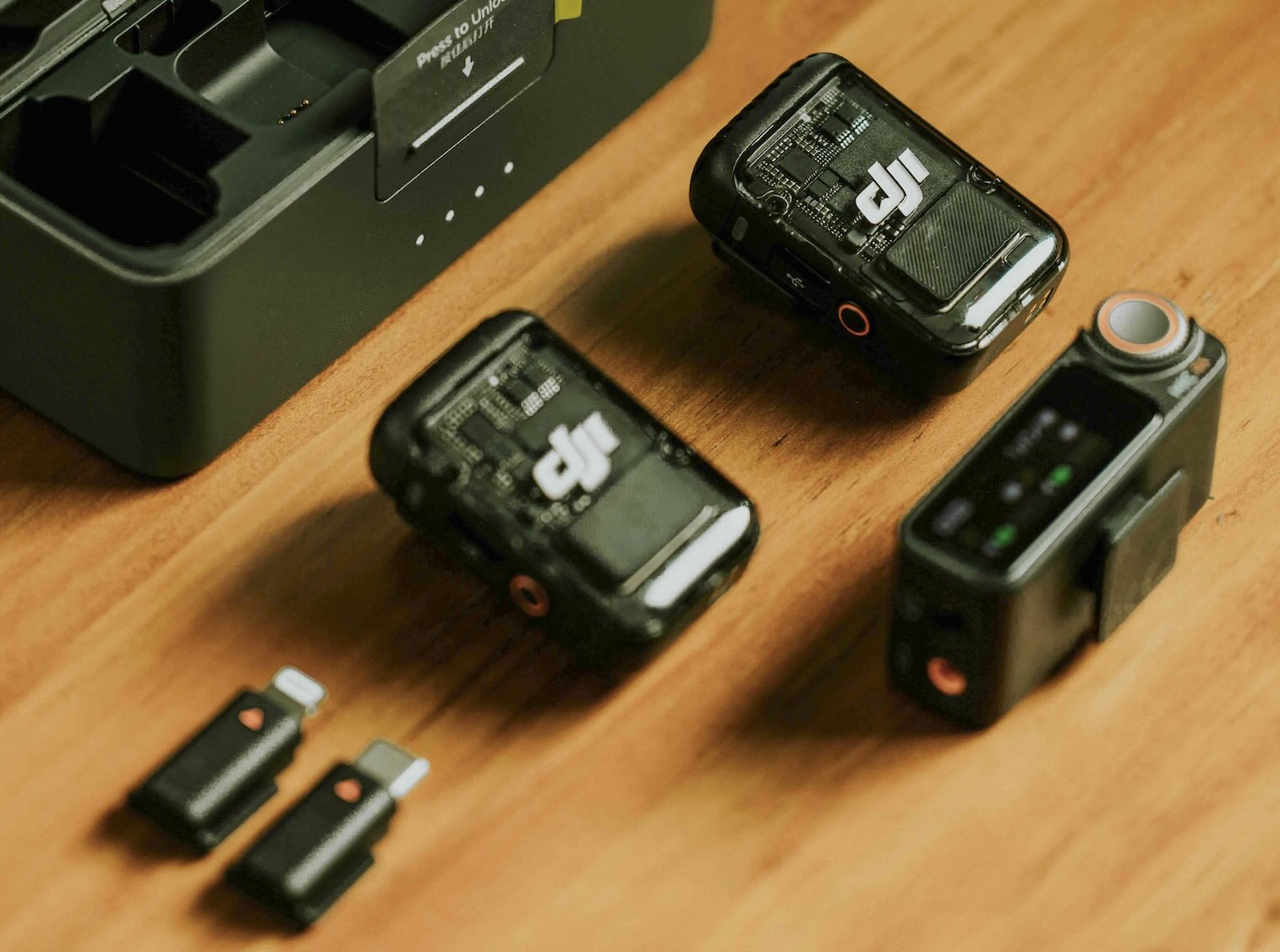
Why Wireless Microphones Are the Best Choice for Live Translation
Wireless microphones have become the industry standard for professional live translation work, and for good reason. They offer significant advantages over traditional wired systems that directly impact translation quality, ease of use, and overall workflow efficiency.
Freedom of Movement
One of the most significant advantages of wireless microphones is the freedom of movement they provide. Unlike wired systems that restrict speaker movement, wireless microphones allow speakers to move naturally, gesture freely, and maintain eye contact with their audience. This natural movement leads to more engaging presentations and better communication, which in turn improves translation accuracy.
No Cable Management Hassles
Traditional wired microphone setups require extensive cable routing, which can be time-consuming and prone to failure. Wireless systems eliminate this entirely - simply connect the receiver to your device and you're ready to go. This simplicity is especially valuable in venues where cable management would be difficult or impossible.
Quick Setup and Teardown
Wireless microphone systems can be set up in minutes, not hours. There's no need to run cables across rooms, tape them down, or worry about tripping hazards. This quick setup is crucial for translation professionals who often work in multiple locations or need to set up quickly before events.
Versatility Across Environments
Wireless microphones work equally well in small meeting rooms, large auditoriums, outdoor venues, and everything in between. This versatility makes them the perfect choice for translation professionals who work in diverse settings.
Simple and Easy Setup Process
One of the biggest advantages of wireless microphones is their simplicity. Setting up a wireless microphone system for live translation is straightforward and requires minimal technical knowledge.
Step-by-Step Setup Guide
-
Connect the Receiver: Plug the wireless microphone receiver into your smartphone, tablet, or computer using the appropriate connector (USB-C, Lightning, or 3.5mm jack).
-
Power On: Turn on both the receiver and the wireless microphone transmitter. Most modern systems automatically pair when powered on.
-
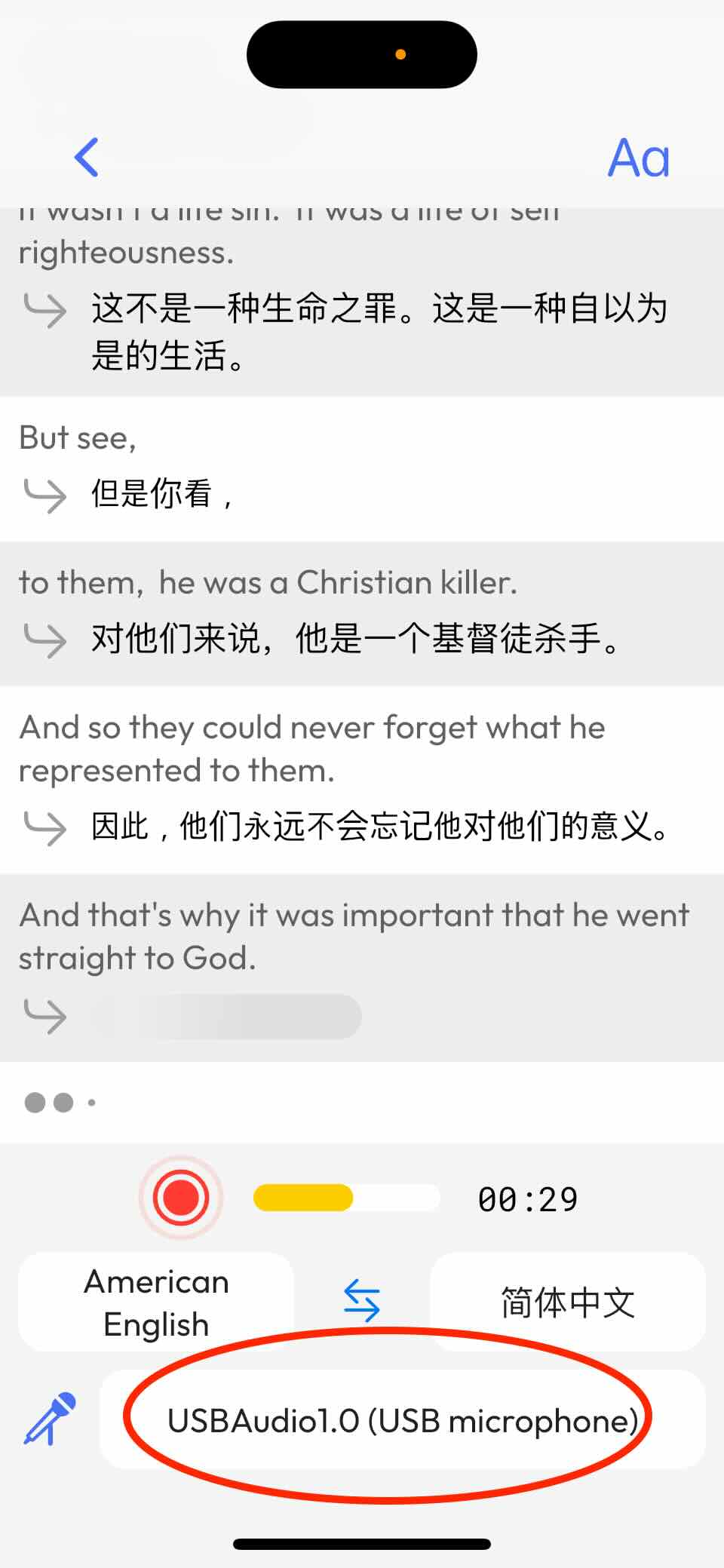
Select in App: Open your Hope Translator app, and the system will automatically detect the connected microphone. Simply select it from the available audio input options.
-
Start Translating: You're ready to begin! The wireless microphone will start capturing audio immediately.
See the image below showing how the mobile app automatically detects and displays all connected microphones:
Ready to try wireless microphones with live translation? Get started with Hope Translator and experience the simplicity of wireless microphone setup for yourself. No credit card required—test it free in demo mode.
Why This Setup is Easier Than Alternatives
Compared to connecting to a sound mixer or complex audio systems, wireless microphones offer a dramatically simpler setup:
- No Mixer Required: You don't need to understand audio mixing, gain levels, or complex routing
- No Cable Routing: No need to run cables from the mixer to your device
- No Technical Expertise: Anyone can set up a wireless microphone system in minutes
- Universal Compatibility: Works with smartphones, tablets, and computers without additional adapters
This simplicity is especially valuable when working in venues with complex audio systems where connecting to a mixer would require coordination with venue staff and technical expertise.
Want to see how easy wireless microphone setup can be? Try Hope Translator free and test your wireless microphone setup in demo mode. See how quickly you can go from unboxing to live translation.
Noise Cancellation: Essential for Noisy Environments
One of the most critical features of modern wireless microphones for live translation is noise cancellation. This feature is essential for maintaining translation accuracy in challenging acoustic environments.
Why Noise Cancellation Matters
Background noise, music, crowd chatter, and ambient sounds can significantly degrade transcription quality, leading to inaccurate translations. Noise cancellation technology filters out these unwanted sounds, ensuring that only the speaker's voice is captured clearly.
When to Use Noise Cancellation
Enable noise cancellation in your wireless microphone settings when working in:
- Conferences and Events: Large gatherings with background conversations
- Worship Services: Environments with music or ambient sound
- Outdoor Venues: Locations with wind, traffic, or environmental noise
- Restaurants and Cafes: Settings with background music and conversations
- Public Spaces: Areas with general ambient noise
How Noise Cancellation Improves Translation Accuracy
When noise cancellation is properly configured, you'll notice:
- Clearer Audio Input: The microphone focuses on the primary speaker
- Better Transcription: Speech recognition systems receive cleaner audio
- More Accurate Translations: Cleaner audio leads to more precise translations
- Reduced Errors: Fewer misinterpretations due to background noise
Most modern wireless microphones include built-in noise cancellation that can be enabled with a simple toggle in the device settings or companion app.
Ready to improve your translation accuracy in noisy environments? Start using Hope Translator with your wireless microphone and experience how noise cancellation improves translation quality. Test it free—no credit card required.
Additional Advantages of Wireless Microphone Systems
Beyond simplicity and noise cancellation, wireless microphones offer several other advantages that make them ideal for live translation work.
Multiple Speaker Support
When translating conversations between multiple people, wireless microphones make it easy to give each speaker their own microphone. This setup requires no additional configuration - simply connect multiple receivers or use a multi-channel system. Each speaker gets clear audio capture, making the translation more accurate and natural.
Magnetic Attachment Options
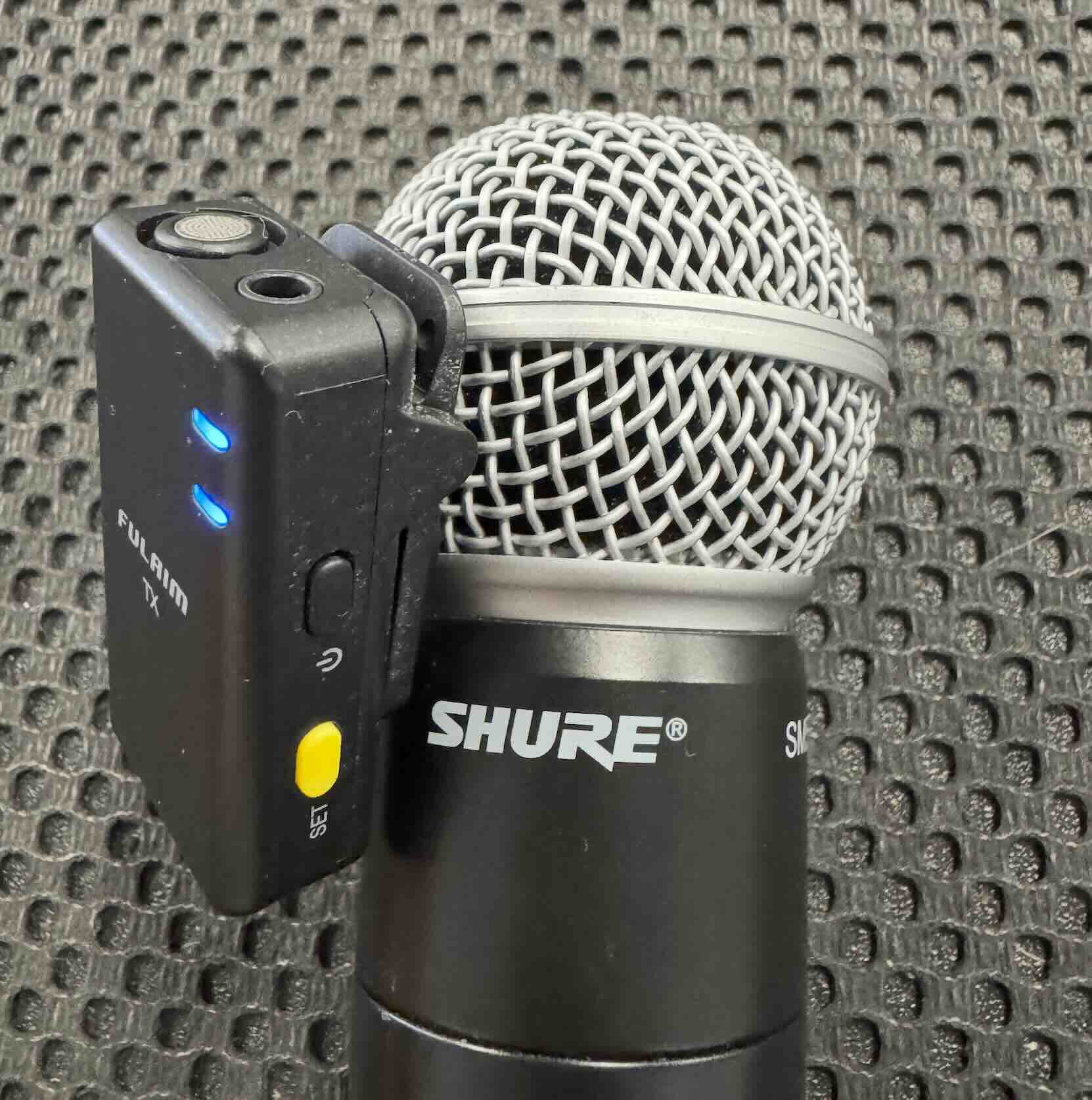
Many wireless lavalier microphones come with magnetic attachments that allow you to quickly attach them to existing wired microphones or clothing. This feature is perfect for situations where you need to quickly switch between different microphone setups or attach the microphone to a speaker's existing equipment.
Below is an example of how we've used this setup - the wireless lavalier microphone is securely attached to a wired microphone using the magnetic connection:
Built-in Recording Capabilities
Many wireless microphone systems include built-in memory for backup recording. This feature provides an additional layer of security, ensuring that audio is captured even if there's an issue with the live translation connection. This backup recording can be invaluable for post-event review or creating transcripts.
Long Battery Life
Modern wireless microphones offer extended battery life, with many systems providing 6-18 hours of continuous use. Some systems even include charging cases that can extend battery life to multiple days. This reliability is essential for professional translation work where sessions can last for hours.
Real-time Monitoring
Many wireless microphone systems include real-time monitoring capabilities, allowing you to hear exactly what's being captured. This feature helps you identify audio issues immediately and adjust settings as needed to ensure optimal translation quality.
Best Practices for Wireless Microphone Setup
To get the best results from your wireless microphone setup, follow these best practices:
1. Position the Microphone Correctly
For lavalier microphones, position the microphone 6-8 inches from the speaker's mouth, typically clipped to a shirt collar or lapel. Ensure the microphone is not covered by clothing or accessories that could muffle the sound.
2. Test Before Important Events
Always test your wireless microphone setup before important translation sessions. Check audio levels, test noise cancellation, and verify that the connection is stable.
3. Monitor Battery Levels
Keep an eye on battery levels throughout your session. Most wireless microphones include battery indicators, and it's wise to have backup batteries or a charging solution ready for extended sessions.
4. Use Noise Cancellation in Noisy Environments
Don't hesitate to enable noise cancellation when working in environments with background noise. This simple setting can dramatically improve translation accuracy.
5. Keep Receivers Close
While wireless microphones offer excellent range, keeping the receiver relatively close to the transmitter (within 30-50 feet) ensures the strongest signal and best audio quality.
Recommended Wireless Microphone Systems
Based on our extensive testing, we recommend the FULAIM X5M Wireless Lavalier Microphone System for most live translation work. This system offers:
- 18-hour battery life with charging case
- 656 feet wireless range
- Built-in noise cancellation
- Simple plug-and-play setup
- Universal compatibility
- Built-in 4GB memory for backup recording
For more detailed information about specific wireless microphone models and comparisons, see our comprehensive guide to the top 5 wireless microphones for live translation.
Ready to set up your wireless microphone system? Get started with Hope Translator and test your wireless microphone setup in demo mode. See how simple professional live translation can be.
Conclusion
Wireless microphones represent the best choice for live translation work, offering unmatched simplicity, flexibility, and performance. Their easy setup, noise cancellation capabilities, and freedom of movement make them superior to traditional wired systems for professional translation applications.
Whether you're working in a quiet meeting room or a noisy conference hall, a properly configured wireless microphone system will deliver the clear, accurate audio needed for high-quality live translation. The simplicity of setup means you can focus on what matters most - delivering accurate, real-time translations to your audience.
Investing in a quality wireless microphone system is an investment in the quality of your translation work. The advantages of wireless systems - from simple setup to noise cancellation - directly translate to better translation accuracy and a more professional experience for your audience.
For more information about translation equipment, setup guides, and best practices, visit our Resources section.
Ready to Get Started?
Wireless microphones make live translation simple, professional, and accessible. Whether you're working in a quiet meeting room or a noisy conference hall, the right wireless microphone setup will deliver the clear, accurate audio needed for high-quality live translation.
Start translating today:
- Try Hope Translator free - Test your wireless microphone setup in demo mode (no credit card required)
- View pricing plans - Transparent pricing starting at $19.99/month
- Contact us - Get help choosing the right wireless microphone for your needs