Presentation Screen vs Personal Devices: When to Use Each
Hope Translator gives you two main ways to share live translation with your audience: display it on a presentation screen at the front of the room, or let people follow along on their own phones or devices. The right choice depends on who needs translation, whether they share one language, and how they prefer to follow along.
This guide helps you decide which approach fits your event.
Reading, Listening, or Both
Before choosing a delivery method, remember that people consume translation differently—and it often depends on their language proficiency:
- Some prefer to read — They follow the text on screen or on their phone
- Some prefer to listen — They use headphones and hear an AI voice read the translation
- Some like both — They read along while listening for better comprehension
Proficiency matters too. Someone who does not understand the spoken language at all may rely fully on translation (reading, listening, or both). Someone who understands a little may only need text as a backup—to catch words they missed or confirm what they heard. More fluent listeners may mainly use transcription for clarity or focus.
Personal devices support all three preferences. With Hope Translator, readers can also adjust font size, hide or show the original transcription, and customize other display settings to match how they like to follow along. Learn more in How to View and Customize Live Translation. A presentation screen is mainly for reading (or captions), so if many people want to listen with headphones, plan for personal devices as well—or offer both.
When to Use Personal Devices
Recommend personal devices when most of the audience already understands the speaker’s language, and only a few people need translation.
In this situation:
- The majority can listen to the speaker directly without looking at a phone or screen
- Only a small group needs help, so a large front-of-room display can be distracting or unnecessary
- Those who need translation can scan a QR code or open a link and follow privately on their own device
- Each person can choose to read, listen, or do both—and pick their preferred language
This approach works well for small groups, mixed-language families, or congregations where most people are fluent in the speaker’s language and a few guests or members need support.
When to Use the Presentation Screen
Recommend the presentation screen when most of the audience needs translation and they share the same target language.
In this situation:
- A large portion of the room depends on the translation to follow the talk
- Everyone who needs help is using the same language, so one shared display is enough
- People can keep looking toward the front instead of looking down at their phones
- The translation feels like part of the event—similar to captions—rather than a personal side channel
This approach is especially effective for churches, conferences, and lectures where the speaker’s language is not the primary language of most attendees, and one translation language covers the room.
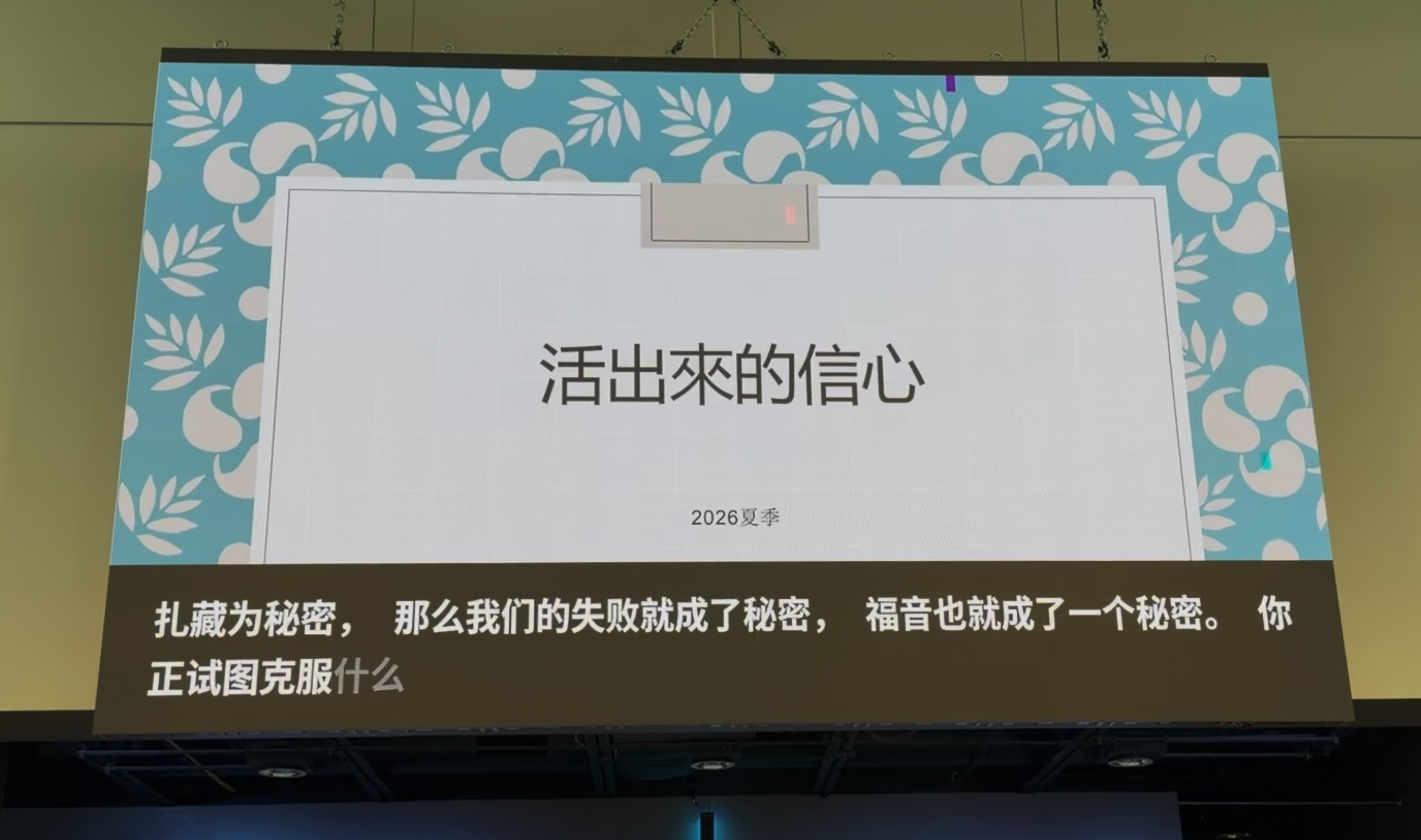
For example, this Chinese church displays live translation as an overlay on the main screen at the front of the room, so the congregation can keep looking forward while following the message.
To set up a professional overlay on ProPresenter, OBS, or other presentation software, see our guide: Presentation and Streaming Software Integration.
Real-Time Transcription at Large Events
In a large event, simply providing transcription in real time is already very helpful—even before full translation. People who cannot understand the spoken language well can read along as the speaker talks. This is especially helpful for people with hearing difficulties. Seeing the words on screen also helps the audience stay focused, especially in a big room where audio can be harder to follow.
A presentation screen works well for this: captions or transcription stay visible at the front, so attendees can listen and read without looking down at a phone.
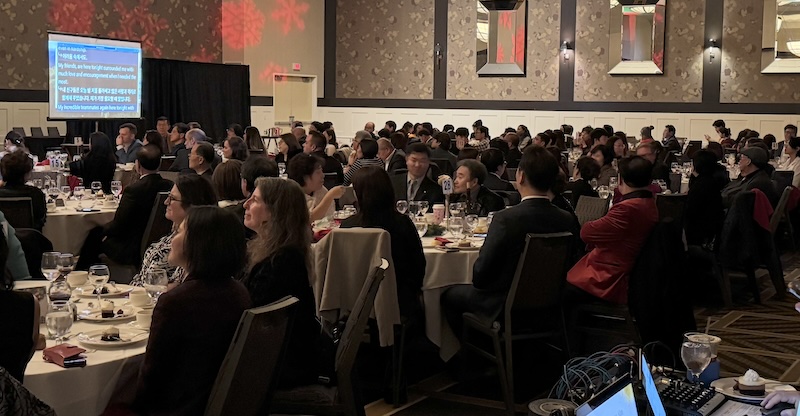
At larger events, the front screen can show both the original transcription and the translation together, so guests who need either—or both—can follow along from their seats.
Quick Decision Guide
| Audience situation | Recommended approach |
|---|---|
| Most people understand the speaker; only a few need translation | Personal devices (QR code / link) |
| Most people need translation; they share one language | Presentation screen at the front |
| Multiple languages needed at once | Personal devices (each person picks a language) |
| Some want to read, some want to listen (especially at larger events) | Personal devices, or screen + devices together |
Combining Both Approaches
You do not always have to choose only one option. Many hosts use both:
- Screen at the front for the main shared language, so most people can look forward
- Personal devices for anyone who prefers listening with headphones, needs a different language, or wants larger text on their own phone
That combination keeps the room focused on the speaker while still giving individuals flexibility.
Getting Started
- Start a broadcast in Hope Translator
- If most people need the same language, set up a screen overlay for your presentation software
- If only a few people need translation—or people want to listen—share a QR code or link so they can join on their devices
- Let attendees choose reading, listening, or both when they join on a personal device
Choosing the right delivery method makes live translation feel natural for your audience. Start with who needs help and how they prefer to follow along, then pick the screen, personal devices, or both.